
In modern enterprise environments, securing remote access is paramount. This implementation demonstrates a comprehensive multi-factor authentication (nFactor) solution on Citrix NetScaler that combines Google reCAPTCHA v2 for bot protection with Duo Security’s OAuth-based MFA. This layered approach provides robust security while maintaining a streamlined user experience.
This blog post breaks down the complete configuration, explaining each component and how they work together to create a secure authentication flow.
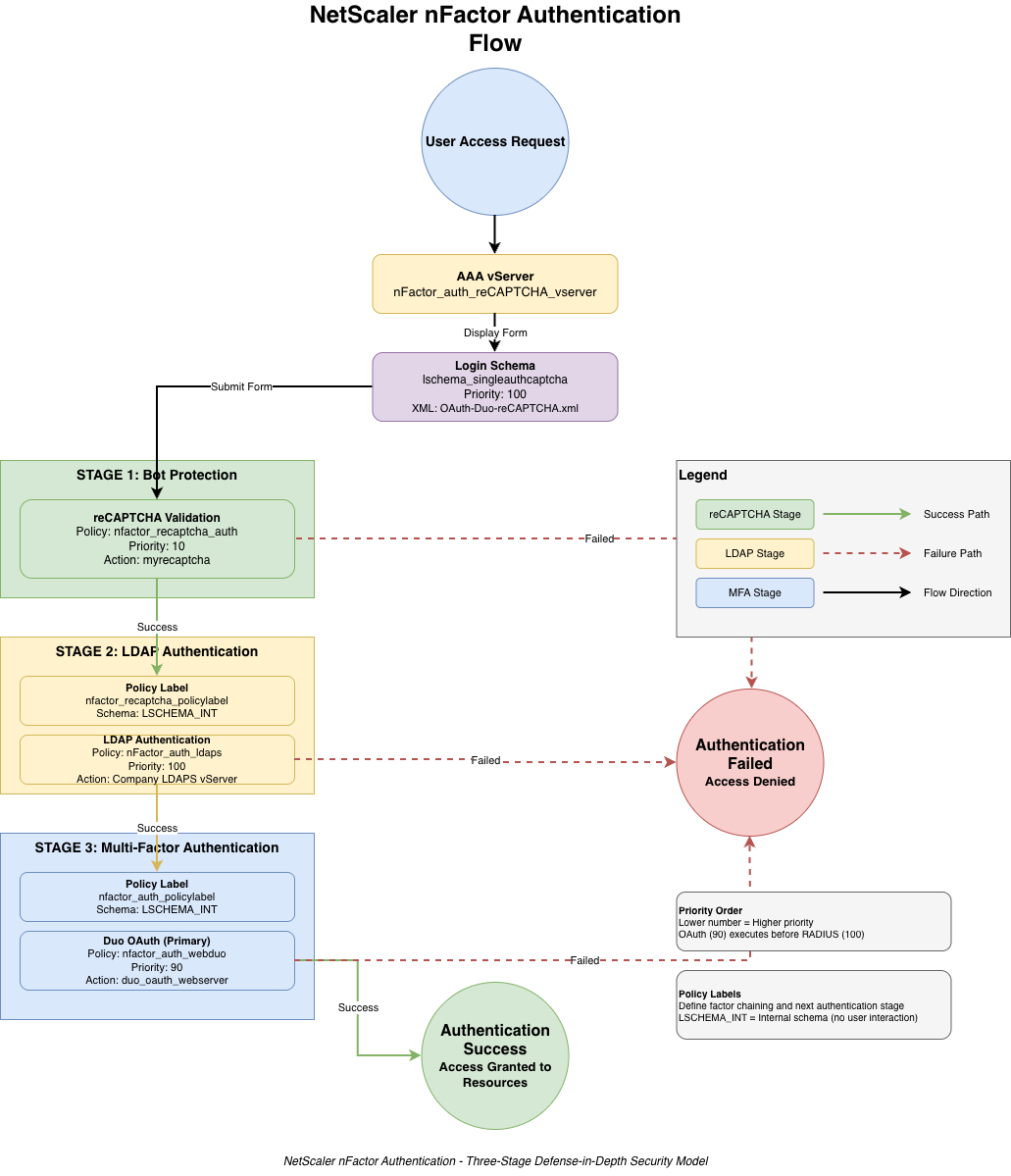
Architecture Overview
The authentication flow consists of three primary stages:
- Stage 1: reCAPTCHA validation (bot protection)
- Stage 2: LDAP/LDAPS authentication (username/password validation)
- Stage 3: Duo OAuth or RADIUS MFA (second factor verification)
Note: Each stage must succeed before progressing to the next, creating a defense-in-depth security model.
Prerequisites: Setting Up Google reCAPTCHA v2
Before configuring NetScaler, you need to register your site with Google reCAPTCHA and obtain the Site Key and Secret Key. This is a free service that provides bot protection for your authentication portal.
Step 1: Access Google reCAPTCHA Admin Console
Navigate to the Google reCAPTCHA administration portal:
https://www.google.com/recaptcha/admin
Sign in with your Google account. If you don’t have a Google account, you’ll need to create one first.
Step 2: Register a New Site
Click on the “+” button or “Register a new site” to begin the registration process.
Step 3: Configure reCAPTCHA Settings
Label: Enter a descriptive name for your site. This is for your reference only and helps you identify the configuration in the admin console.
Example: Use your gateway hostname or a descriptive name like “Corporate VPN Gateway” or “Remote Access Portal”
Choose the type of reCAPTCHA: Select reCAPTCHA V2
- reCAPTCHA V2 – Validate users with the “I’m not a robot” checkbox (Recommended)
- Invisible reCAPTCHA – Validates users in the background (Not compatible with this NetScaler configuration)
Important: NetScaler’s nFactor captcha integration requires reCAPTCHA V2 with the visible checkbox. Do not select “Invisible reCAPTCHA” as it will not work with the NetScaler implementation.
Domains: Enter your NetScaler Gateway domain name (one per line). This is the FQDN that users will access to reach your authentication portal.
Example: If users access your gateway at https://vpn.company.com, enter:vpn.company.com
Accept the reCAPTCHA Terms of Service: Check the box to accept Google’s terms.
Send alerts to owners: (Optional) Check this box if you want Google to send you email alerts about configuration issues or suspicious traffic patterns.
Step 4: Retrieve Your Keys
After clicking “Register,” Google will generate two keys that you’ll need for NetScaler configuration:
Site Key: This is embedded in the HTML login page that users see. It’s safe to expose publicly as it only identifies your site to Google’s reCAPTCHA service.
Secret Key: This is used for server-side validation between NetScaler and Google. Keep this confidential – it should never be visible in client-side code or shared publicly.
Security Warning: Store both keys securely. The Secret Key is sensitive and should be treated like a password. If compromised, regenerate it immediately from the reCAPTCHA admin console.
Step 5: Configure NetScaler Captcha Action
With your Site Key and Secret Key in hand, you’ll create a captcha action on NetScaler. This configuration tells NetScaler how to validate users with Google’s reCAPTCHA service:
add authentication captchaAction myrecaptcha -serverURL "https://www.google.com/recaptcha/api/siteverify" -siteKey "[YOUR_SITE_KEY]" -secretKey "[YOUR_SECRET_KEY]"
Parameters explained:
myrecaptcha: The name of the captcha action (referenced in authentication policies)-serverURL: Google’s verification endpoint (always the same)-siteKey: Your Site Key from Step 4-secretKey: Your Secret Key from Step 4
Testing Tip: After configuration, test reCAPTCHA thoroughly. Google provides test keys for development environments:
Site Key: 6LeIxAcTAAAAAJcZVRqyHh71UMIEGNQ_MXjiZKhI
Secret Key: 6LeIxAcTAAAAAGG-vFI1TnRWxMZNFuojJ4WifJWe
These test keys always validate successfully and can be used for initial configuration testing.
Verification
To verify your reCAPTCHA is working correctly:
- Access your NetScaler Gateway URL
- Verify the reCAPTCHA widget appears on the login page
- Complete the “I’m not a robot” checkbox
- Check NetScaler logs for successful captcha validation
You can monitor reCAPTCHA activity and traffic in the Google reCAPTCHA admin console under the “Analytics” tab for your registered site.
Infrastructure Components
TCP Profile Optimization
The configuration begins with a custom TCP profile optimized for Citrix Virtual Apps and Desktops (XA/XD) traffic. This profile enables performance optimizations crucial for ICA protocol efficiency:
add ns tcpProfile nstcp_custom_XA_XD_profile -nagle ENABLED -maxPktPerMss 10 -pktPerRetx 3 -minRTO 200 -rstMaxAck ENABLED -spoofSynDrop DISABLED -tcpFastOpen ENABLED -Hystart ENABLEDKey parameters explained:
nagle ENABLED: Reduces small packet overhead by combining small packetsmaxPktPerMss 10: Allows up to 10 packets per Maximum Segment SizeminRTO 200: Minimum retransmission timeout of 200ms for faster recoverytcpFastOpen ENABLED: Reduces connection establishment latencyHystart ENABLED: Enhanced slow-start algorithm for faster connection ramp-up
SSL/TLS Configuration
Security is enforced through modern SSL/TLS standards with a custom frontend profile that disables legacy protocols and implements perfect forward secrecy (PFS):
add ssl profile TLS_1.3_Profile -dh ENABLED -dhFile "/nsconfig/ssl/dhkey2048.key" -eRSA DISABLED -sessReuse ENABLED -sessTimeout 120 -tls1 DISABLED -tls11 DISABLED -tls13 ENABLED -ocspStapling ENABLED -HSTS ENABLED -maxage 31536000
Security Features:
- Disables TLS 1.0 and 1.1 (legacy, insecure protocols)
- Enables TLS 1.3 for maximum security and performance
- Implements HSTS with 1-year max-age to prevent downgrade attacks
- Enables OCSP stapling for efficient certificate validation
The cipher suite prioritization ensures forward secrecy:
bind ssl profile TLS_1.3_Profile -eccCurveName X_25519
bind ssl profile TLS_1.3_Profile -eccCurveName P_256
bind ssl profile TLS_1.3_Profile -eccCurveName P_384
bind ssl profile TLS_1.3_Profile -eccCurveName P_224
bind ssl profile TLS_1.3_Profile -eccCurveName P_521
bind ssl profile TLS_1.3_Profile -cipherName TLS1.3-AES256-GCM-SHA384 -cipherPriority 1
bind ssl profile TLS_1.3_Profile -cipherName TLS1.3-AES128-GCM-SHA256 -cipherPriority 2
bind ssl profile TLS_1.3_Profile -cipherName TLS1.3-CHACHA20-POLY1305-SHA256 -cipherPriority 3
bind ssl profile TLS_1.3_Profile -cipherName TLS1.2-ECDHE-RSA-AES256-GCM-SHA384 -cipherPriority 4
bind ssl profile TLS_1.3_Profile -cipherName TLS1.2-ECDHE-RSA-AES128-GCM-SHA256 -cipherPriority 5
bind ssl profile TLS_1.3_Profile -cipherName TLS1.2-DHE-RSA-AES256-GCM-SHA384 -cipherPriority
LDAP Authentication Configuration
The LDAP action connects to a load-balanced LDAPS service group for high availability and secure directory authentication:
add authentication ldapAction "Company LDAPS Authentication vServer" -serverIP 10.x.x.224 -serverPort 636 -ldapBase "dc=company, dc=com" -ldapBindDn svcaccount@company.com -ldapBindDnPassword [ENCRYPTED] -encrypted -encryptmethod ENCMTHD_4 -kek -suffix 2021_09_10_18_08_49 -ldapLoginName sAMAccountName -groupAttrName memberOf -subAttributeName cn -secType SSL -passwdChange ENABLED -nestedGroupExtraction ON -groupNameIdentifier sAMAccountName -groupSearchAttribute memberOf -groupSearchSubAttribute CNImportant LDAP features:
secType SSL: Ensures encrypted LDAP communications over port 636nestedGroupExtraction ON: Supports complex Active Directory group structurespasswdChange ENABLED: Allows users to change expired passwords during loginsAMAccountName: Uses Windows username format for authentication
The LDAP service group provides load balancing and failover across domain controllers:
add serviceGroup "Company LDAPS vService Group" SSL_BRIDGE -maxClient 0 -maxReq 0 -cip DISABLED -usip NO -useproxyport YES -cltTimeout 180 -svrTimeout 360 -CKA NO -TCPB NO -CMP NO

bind serviceGroup "Company LDAPS vService Group" DC0X.COMPANY.COM 636
bind serviceGroup "Company LDAPS vService Group" DC0X.COMPANY.COM 636 -state DISABLED
bind serviceGroup "Company LDAPS vService Group" -monitorName tcp
Duo MFA Configuration
The implementation provides two MFA paths: OAuth (preferred) and RADIUS (fallback). The OAuth implementation offers a more seamless user experience with push notifications and modern authentication flows.
add authentication OAuthAction duo_oauth_webserver -authorizationEndpoint "https://api-XXXXXXXX.duosecurity.com/oauth/v1/authorize?scope=openid" -tokenEndpoint "https://api-XXXXXXXX.duosecurity.com/oauth/v1/token" -clientID [CLIENT_ID] -clientSecret [ENCRYPTED] -encrypted -encryptmethod ENCMTHD_4 -kek -suffix 2021_09_10_18_08_49 -OAuthMiscFlags EnableJWTRequest -PKCE DISABLED -tokenEndpointAuthMethod client_secret_jwtOAuth configuration details:
- Uses OpenID Connect scope for identity verification
EnableJWTRequest: Enables JWT-based authentication tokensclient_secret_jwt: Secure token endpoint authentication method- Integration with Duo’s OAuth v1 endpoints for MFA
nFactor Authentication Flow
The nFactor flow orchestrates the multi-stage authentication process through policy labels and factor chaining. This is the heart of the implementation.
Authentication Policies
Each authentication stage is defined by a policy that binds an action:
add authentication Policy nfactor_recaptcha_auth -rule true -action myrecaptcha

add authentication Policy nFactor_auth_ldaps -rule true -action "Company LDAPS Authentication vServer"

add authentication Policy nFactor_auth_radius -rule true -action "DUO Proxy Server - nFactor"

add authentication Policy nfactor_auth_webduo -rule true -action duo_oauth_webserver
Note: All policies use rule true meaning they always execute when encountered in the flow. Advanced policies could use expression-based rules for conditional logic (e.g., group membership, IP ranges, device posture).
Policy Labels (Factor Chaining)
Policy labels create the authentication chain. Each label represents a stage in the flow:
# Label 1: After reCAPTCHA - perform LDAP authentication
add authentication policylabel nfactor_recaptcha_policylabel -loginSchema LSCHEMA_INT

bind authentication policylabel nfactor_recaptcha_policylabel -policyName nFactor_auth_ldaps -priority 100 -gotoPriorityExpression NEXT -nextFactor nfactor_auth_policylabel

# Label 2: After LDAP - perform MFA (OAuth preferred)
add authentication policylabel nfactor_auth_policylabel -loginSchema LSCHEMA_INT

bind authentication policylabel nfactor_auth_policylabel -policyName nfactor_auth_webduo -priority 90 -gotoPriorityExpression END
Login Schema – The User Interface
The login schema (XML file) defines what the user sees and interacts with. This custom schema presents username, password, and reCAPTCHA on a single page for a streamlined experience. We need to pass the AAA.USER.ATTRIBUTE settings so that DUO Web oAuth works.
Login Schema Configuration
add authentication loginSchema lschema_singleauthcaptcha -authenticationSchema "/nsconfig/loginschema/OAuth-Duo-reCAPTCHA.xml" -userExpression "AAA.USER.ATTRIBUTE(1)" -passwdExpression "AAA.USER.ATTRIBUTE(2)" -userCredentialIndex 1 -passwordCredentialIndex 2 -SSOCredentials YES
SSO Configuration: The userExpression and passwdExpression attributes enable single sign-on to backend applications by passing authenticated credentials forward using AAA attributes.
OAuth-Duo-reCAPTCHA.xml Breakdown
The XML schema file defines the structure of the login form. Here’s the complete file with key sections explained:
<?xml version="1.0" encoding="UTF-8"?>
<AuthenticateResponse xmlns="http://citrix.com/authentication/response/1">
  <Status>success</Status>
  <r>more-info</r>
  <StateContext/>
  <AuthenticationRequirements>
    <PostBack>/nf/auth/doAuthentication.do</PostBack>
    <CancelPostBack>/nf/auth/doLogoff.do</CancelPostBack>
    <CancelButtonText>Cancel</CancelButtonText>
    <Requirements>

      <!-- Requirement 1: Login label/header -->
      <Requirement>
        <Credential><Type>none</Type></Credential>
        <Label>
          <Text>singleauthmanageotp_please_log_on</Text>
          <Type>nsg-login-label</Type>
        </Label>
        <Input/>
      </Requirement>

      <!-- Requirement 2: Username field -->
      <Requirement>
        <Credential>
          <ID>login</ID>
          <SaveID>ExplicitForms-Username</SaveID>
          <Type>username</Type>
        </Credential>
        <Label>
          <Text>singleauth_user_name</Text>
          <Type>nsg-login-label</Type>
        </Label>
        <Input>
          <Text>
            <Secret>false</Secret>
            <ReadOnly>false</ReadOnly>
            <InitialValue/>
            <Constraint>.+</Constraint>
          </Text>
        </Input>
      </Requirement>

      <!-- Requirement 3: Password field -->
      <Requirement>
        <Credential>
          <ID>passwd</ID>
          <SaveID>ExplicitForms-Password</SaveID>
          <Type>password</Type>
        </Credential>
        <Label>
          <Text>singleauth_password</Text>
          <Type>nsg-login-label</Type>
        </Label>
        <Input>
          <Text>
            <Secret>true</Secret>
            <ReadOnly>false</ReadOnly>
            <InitialValue/>
            <Constraint>.+</Constraint>
          </Text>
        </Input>
      </Requirement>

      <!-- Requirement 4: reCAPTCHA widget -->
      <Requirement>
        <Credential>
          <ID>nf-recaptcha</ID>
          <Type>nf-recaptcha</Type>
        </Credential>
        <Label>
          <Text>singleauthcaptcha_captcha</Text>
          <Type>nsg-login-label</Type>
        </Label>
      </Requirement>

      <!-- Requirement 5: Spacer for layout -->
      <Requirement>
        <Credential><Type>none</Type></Credential>
        <Label></Label>
        <Input/>
      </Requirement>

      <!-- Requirement 6: Remember password checkbox -->
      <Requirement>
        <Credential>
          <ID>saveCredentials</ID>
          <Type>savecredentials</Type>
        </Credential>
        <Label>
          <Text>singleauth_remember_my_password</Text>
          <Type>nsg-login-label</Type>
        </Label>
        <Input>
          <CheckBox>
            <InitialValue>false</InitialValue>
          </CheckBox>
        </Input>
      </Requirement>

      <!-- Requirement 7: Login button -->
      <Requirement>
        <Credential>
          <ID>loginBtn</ID>
          <Type>none</Type>
        </Credential>
        <Label><Type>none</Type></Label>
        <Input>
          <Button>singleauth_log_on</Button>
        </Input>
      </Requirement>

    </Requirements>
  </AuthenticationRequirements>
</AuthenticateResponse>
Key XML elements explained:
Type="nf-recaptcha": Enables Google reCAPTCHA v2 widget integrationConstraint=".+": Regular expression requiring non-empty inputSecret=true: Masks the password field for securitySaveID: Enables credential saving for future sessions (if user opts in)
Authentication Virtual Server
The authentication virtual server orchestrates the entire nFactor flow. It’s the central configuration point that ties all policies, schemas, and labels together.
add authentication vserver nFactor_auth_reCAPTCHA_vserver SSL 0.0.0.0 -appflowLog DISABLED -maxLoginAttempts 3 -failedLoginTimeout 900
Security features:
maxLoginAttempts 3: Limits authentication attempts to prevent brute forcefailedLoginTimeout 900: 15-minute lockout after failed attempts0.0.0.0binding: Internal auth vserver (not directly accessible from outside)
Policy Bindings
The authentication vserver bindings define the initial login schema and the first authentication factor:
# Bind the login schema (what the user sees first)
bind authentication vserver nFactor_auth_reCAPTCHA_vserver -policy lschema_singleauthcaptcha -priority 100 -gotoPriorityExpression END

# Bind the first authentication factor (reCAPTCHA)
bind authentication vserver nFactor_auth_reCAPTCHA_vserver -policy nfactor_recaptcha_auth -priority 10 -nextFactor nfactor_recaptcha_policylabel -gotoPriorityExpression NEXT
Flow Creation: The binding order creates the complete authentication flow:
Login Schema → reCAPTCHA → LDAP → MFA (OAuth or RADIUS)
Citrix Gateway Virtual Server
The Citrix Gateway (NetScaler Gateway) vServer is the user-facing entry point that references the authentication profile:
add vpn vserver nsg_remote_external SSL 192.168.x.x 443 -maxAAAUsers 500 -icaOnly ON -dtls OFF -downStateFlush DISABLED -Listenpolicy NONE -tcpProfileName nstcp_custom_XA_XD_profile -maxLoginAttempts 5 -failedLoginTimeout 5 -authnProfile nFactor_reCAPTCHA_auth_profile
Critical parameters:
authnProfile: Links to the nFactor authentication virtual servericaOnly ON: Restricts to ICA/HDX traffic only (no full VPN tunnel mode)dtls OFF: Disables DTLS (typically for compatibility)maxAAAUsers 500: Maximum concurrent authenticated userstcpProfileName: Uses the custom optimized TCP profile
Authentication Profile
The authentication profile links the Gateway vServer to the authentication vServer:
add authentication authnProfile nFactor_reCAPTCHA_auth_profile -authnVsName nFactor_auth_reCAPTCHA_vserver
Session Policies and SSO
Session policies define post-authentication behavior, including StoreFront integration and SSO configuration: (you can also set to true since both web and “reciever” can not be treated as one.
# Session action for web browsers
add vpn sessionAction "Receiver for Web" -transparentInterception OFF -defaultAuthorizationAction ALLOW -SSO ON -icaProxy ON -wihome "https://storefront.company.com/Citrix/CompanyNameWeb" -ntDomain company.com -clientlessVpnMode OFF

# Session policy binding based on user agent
add vpn sessionPolicy Web_Session_Policy "REQ.HTTP.HEADER User-Agent NOTCONTAINS CitrixReceiver" "Receiver for Web"
SSO Configuration:
add vpn trafficAction nFactorSSO_action http -kcdAccount NONE -userExpression "AAA.USER.ATTRIBUTE(1)" -passwdExpression "AAA.USER.ATTRIBUTE(2)"

add vpn trafficPolicy nFactorSSO_policy true nFactorSSO_action
Complete Authentication Flow Visualization
The NetScaler configuration includes a built-in visualization of the nFactor flow. Here’s the complete flow as documented:
# nFactor Visualizer Output:
# AAA vserver: nFactor_auth_reCAPTCHA_vserver
#   Login Schema Policy = lschema_singleauthcaptcha
#     Priority = 100
#     Rule = true
#     Login Schema XML = "/nsconfig/loginschema/OAuth-Duo-reCAPTCHA.xml"
#   Adv Authn Policy = nfactor_recaptcha_auth
#     Priority = 10
#     Rule = true
#     Action = captchaAction named myrecaptcha
#     Goto if failed = NEXT
#     Next Factor if Success = nfactor_recaptcha_policylabel
#       Login Schema Profile = LSCHEMA_INT
#       Adv Authn Policy = nFactor_auth_ldaps
#         Priority = 100
#         Rule = true
#         Action = ldapAction named "Company LDAPS Authentication vServer"
#         Goto if failed = NEXT
#         Next Factor if Success = nfactor_auth_policylabel
#           Login Schema Profile = LSCHEMA_INT
#           Adv Authn Policy = nfactor_auth_webduo
#             Priority = 90
#             Rule = true
#             Action = OAuthAction named duo_oauth_webserver
#             Goto if failed = END
#           Adv Authn Policy = nFactor_auth_radius
#             Priority = 100
#             Rule = true
#             Action = radiusAction named "DUO Proxy Server - nFactor"
#             Goto if failed = END
Summary and Best Practices
This implementation demonstrates enterprise-grade authentication with multiple layers of security:
Key Security Features
- Bot Protection: Google reCAPTCHA v2 prevents automated attacks and credential stuffing
- Strong Authentication: LDAPS ensures encrypted directory authentication
- Modern MFA: Duo OAuth provides push-based second factor with RADIUS fallback
- Account Lockout: Configurable login attempt limits prevent brute force attacks
- TLS 1.3: Latest encryption standards with perfect forward secrecy cipher suites
- HSTS: Enforces HTTPS to prevent protocol downgrade attacks
- Defense in Depth: Three independent authentication layers must all succeed
User Experience Optimizations
- Single-Page Login: Username, password, and reCAPTCHA presented on one screen
- SSO Integration: Seamless access to Citrix resources after authentication
- Credential Saving: Optional password persistence for trusted devices
- TCP Optimization: Custom profile enhances ICA/HDX protocol performance
- Modern OAuth: Better UX than legacy RADIUS for primary MFA method
Implementation Considerations
- High Availability: Service groups provide load balancing and automatic failover
- Monitoring: Syslog integration enables centralized authentication logging
- Scalability: Supports up to 500 concurrent users on this vServer instance
- Flexibility: Policy-based architecture allows conditional logic expansion
- Maintainability: Modular design makes updates and troubleshooting easier
- Compliance: Meets modern security standards for MFA and encryption
Security Note: Always use encrypted passwords in production configurations. The example shows encrypted password hashes – never commit plaintext credentials to version control or documentation.
NetScaler Configuration File
Below is the entire configuration file template
#
# Generic NetScaler Configuration: reCAPTCHA + LDAP + DUO Multi-Factor Authentication
# This configuration demonstrates a comprehensive three-factor nFactor authentication flow
# Replace placeholder values with your environment-specific details
#
# Author: Daniel Ruiz - https://danielruiz.net
# Blog Post: https://danielruiz.net/2026/01/05/netscaler-nfactor-authentication-with-recaptcha-and-duo-oauth/
#

# ========================================
# AUTHENTICATION FLOW OVERVIEW
# ========================================
#
# Factor 1: Google reCAPTCHA (Bot Protection)
#
# Factor 2: LDAP Authentication (Username/Password)
#
# Factor 3: DUO Multi-Factor (Push/SMS/Phone)
#

# ========================================
# PREREQUISITES
# ========================================
#
# 1. NetScaler Features Required:
#    - AAA, SSL, Load Balancing, Rewrite, Responder, SSLVPN
#
# 2. External Services:
#    - Google reCAPTCHA v2 keys (Site Key + Secret Key)
#    - DUO Security account with OAuth integration configured
#    - Active Directory/LDAP with LDAPS (port 636)
#
# 3. Custom Files:
#    - Custom login schema XML: /nsconfig/loginschema/OAuth-Duo-reCAPTCHA.xml
#    - Portal theme customizations in: /var/netscaler/logon/themes/
#

# ========================================
# ENABLE REQUIRED FEATURES
# ========================================

enable ns feature AAA
enable ns feature ssl
enable ns feature lb
enable ns feature rewrite
enable ns feature RESPONDER
enable ns feature SSLVPN


# ========================================
# TCP PROFILE (Performance Optimization)
# ========================================

add ns tcpProfile tcp_profile_optimized -nagle ENABLED -maxPktPerMss 10 -pktPerRetx 3 -minRTO 200 -rstMaxAck ENABLED -spoofSynDrop DISABLED -tcpFastOpen ENABLED -Hystart ENABLED


# ========================================
# REWRITE POLICIES (UI Customization)
# ========================================

enable ns feature rewrite

# Replace default favicon with custom one
add rewrite action act_favicon_replace replace_all "HTTP.RES.BODY(120000)" q{"href=\"/vpn/media/favicon.ico\""} -search q{text("href=\"/vpn/images/AccessGateway.ico\"")}
add rewrite policy pol_favicon_replace "HTTP.REQ.URL.CONTAINS(\"/index.html\") || HTTP.REQ.URL.CONTAINS(\"/tmindex.html\")" act_favicon_replace

# Hide MFA password field after first authentication
add rewrite action rw_act_hide_mfa_pwd insert_http_header Set-Cookie "\"pwcount=1\"" -comment "Hide MFA password field"
add rewrite policy rw_pol_hide_mfa_pwd "HTTP.REQ.HEADER(\"Cookie\").CONTAINS(\"pwcount\").NOT" rw_act_hide_mfa_pwd -comment "Hide MFA password field"


# ========================================
# RESPONDER POLICIES (Redirects & Logoff)
# ========================================

enable ns feature RESPONDER

# Redirect after logout
add responder action logoff_redirect redirect "\"https://your-gateway-fqdn.com\"" -responseStatusCode 302
add responder action logoff_redirect2 redirect "\"https://your-gateway-fqdn.com\"" -responseStatusCode 302

add responder policy logoff_redirect_pol "HTTP.REQ.URL.CONTAINS(\"/cgi/logout\")" logoff_redirect
add responder policy logoff_redirect2_pol "HTTP.REQ.URL.CONTAINS(\"/vpn/logout.html\")" logoff_redirect2

# ========================================
# SYSLOG CONFIGURATION
# ========================================

# Syslog server for AAA authentication logs
add audit syslogAction syslog_aaa_action 10.x.x.syslog -logLevel EMERGENCY ALERT CRITICAL -managementlog ALL -mgmtlogLevel ALL -logFacility LOCAL1 -timeZone LOCAL_TIME -userDefinedAuditlog YES

add audit syslogPolicy syslog_aaa_policy true syslog_aaa_action

set audit syslogParams -userDefinedAuditlog YES
bind audit syslogGlobal -policyName syslog_aaa_policy -priority 2


# ========================================
# SSL CONFIGURATION
# ========================================

enable ns feature ssl
set ssl parameter -defaultProfile ENABLED

# SSL Certificates
# Replace with your actual certificate files and names
add ssl certKey ssl-cert-gateway -cert your-gateway-cert.pem -key your-gateway-key.key
add ssl certKey ssl-cert-intermediate -cert intermediate-ca.pem
add ssl certKey ssl-cert-root -cert root-ca.pem
add ssl certKey ssl-cert-storefront -cert storefront-cert.pfx -key storefront-cert.pfx -inform PFX

# Link certificate chain
link ssl certKey ssl-cert-gateway ssl-cert-intermediate
link ssl certKey ssl-cert-intermediate ssl-cert-root

# SSL Profile - Frontend (Strong Security)
add ssl profile TLS1.3_ssl_profile -dh ENABLED -dhFile "/nsconfig/ssl/dhkey2048.key" -eRSA DISABLED -sessReuse ENABLED -sessTimeout 120 -tls1 DISABLED -tls11 DISABLED -tls13 ENABLED -ocspStapling ENABLED -HSTS ENABLED -maxage 31536000

bind ssl profile TLS1.3_ssl_profile -eccCurveName X_25519
bind ssl profile TLS1.3_ssl_profile -eccCurveName P_256
bind ssl profile TLS1.3_ssl_profile -eccCurveName P_384
bind ssl profile TLS1.3_ssl_profile -eccCurveName P_224
bind ssl profile TLS1.3_ssl_profile -eccCurveName P_521

bind ssl profile TLS1.3_ssl_profile -cipherName TLS1.3-AES256-GCM-SHA384 -cipherPriority 1
bind ssl profile TLS1.3_ssl_profile -cipherName TLS1.3-AES128-GCM-SHA256 -cipherPriority 2
bind ssl profile TLS1.3_ssl_profile -cipherName TLS1.3-CHACHA20-POLY1305-SHA256 -cipherPriority 3
bind ssl profile TLS1.3_ssl_profile -cipherName TLS1.2-ECDHE-RSA-AES256-GCM-SHA384 -cipherPriority 4
bind ssl profile TLS1.3_ssl_profile -cipherName TLS1.2-ECDHE-RSA-AES128-GCM-SHA256 -cipherPriority 5
bind ssl profile TLS1.3_ssl_profile -cipherName TLS1.2-DHE-RSA-AES256-GCM-SHA384 -cipherPriority 6

# Backend SSL Profile (for internal connections)
bind ssl profile ns_default_ssl_profile_backend -eccCurveName X_25519
bind ssl profile ns_default_ssl_profile_backend -eccCurveName P_256
bind ssl profile ns_default_ssl_profile_backend -eccCurveName P_384
bind ssl profile ns_default_ssl_profile_backend -eccCurveName P_224
bind ssl profile ns_default_ssl_profile_backend -eccCurveName P_521

# Default frontend SSL profile enhancements
set ssl profile ns_default_ssl_profile_frontend -dh ENABLED -dhFile "/nsconfig/ssl/dhkey2048.key" -eRSA ENABLED -sessReuse ENABLED -tls1 DISABLED -tls11 DISABLED -tls13 ENABLED -denySSLReneg NONSECURE -HSTS ENABLED -maxage 157680000 -zeroRttEarlyData ENABLED

bind ssl profile ns_default_ssl_profile_frontend -eccCurveName X_25519
bind ssl profile ns_default_ssl_profile_frontend -eccCurveName P_256
bind ssl profile ns_default_ssl_profile_frontend -eccCurveName P_384
bind ssl profile ns_default_ssl_profile_frontend -eccCurveName P_224
bind ssl profile ns_default_ssl_profile_frontend -eccCurveName P_521


# ========================================
# PORTAL THEME (Optional Customization)
# ========================================

add vpn portaltheme CustomTheme -basetheme RfWebUI

# *** Note: Portal theme customizations are stored in:
# *** /var/netscaler/logon/themes/CustomTheme/


# ========================================
# AAA CONFIGURATION - AUTHENTICATION ACTIONS
# ========================================

enable ns feature AAA

# ----------------------------------------
# LDAP Action (Active Directory)
# ----------------------------------------
add authentication ldapAction ldap_action_ad -serverIP 10.x.x.ldap -serverPort 636 -ldapBase "dc=yourdomain, dc=com" -ldapBindDn svc-netscaler@yourdomain.com -ldapBindDnPassword <your_encrypted_password> -ldapLoginName sAMAccountName -groupAttrName memberOf -subAttributeName cn -secType SSL -passwdChange ENABLED -nestedGroupExtraction ON -groupNameIdentifier sAMAccountName -groupSearchAttribute memberOf -groupSearchSubAttribute CN

# Note: LDAP certificate Root CA should be in /nsconfig/truststore

# ----------------------------------------
# OAuth Action (DUO OAuth - Web Authentication)
# ----------------------------------------
# Primary method: DUO Universal Prompt via OAuth
add authentication OAuthAction oauth_action_duo -authorizationEndpoint "https://api-xxxxxxxx.duosecurity.com/oauth/v1/authorize?scope=openid" -tokenEndpoint "https://api-xxxxxxxx.duosecurity.com/oauth/v1/token" -clientID your-duo-client-id -clientSecret <your_encrypted_duo_client_secret> -OAuthMiscFlags EnableJWTRequest -PKCE DISABLED -tokenEndpointAuthMethod client_secret_jwt

# Replace:
# - api-xxxxxxxx.duosecurity.com with your DUO API hostname
# - your-duo-client-id with your actual DUO Client ID
# - <your_encrypted_duo_client_secret> with your encrypted DUO Client Secret

# ----------------------------------------
# Google reCAPTCHA Action
# ----------------------------------------
add authentication captchaAction captcha_action_recaptcha -serverURL "https://www.google.com/recaptcha/api/siteverify" -siteKey "your-recaptcha-site-key" -secretKey "your-recaptcha-secret-key" -defaultAuthenticationGroup "reCAPTCHA-Verified"

# Replace:
# - your-recaptcha-site-key with your Google reCAPTCHA Site Key
# - your-recaptcha-secret-key with your Google reCAPTCHA Secret Key


# ========================================
# AAA CONFIGURATION - AUTHENTICATION POLICIES
# ========================================

# Google reCAPTCHA Policy (Factor 1)
add authentication Policy policy_recaptcha -rule true -action captcha_action_recaptcha

# LDAP Policy (Factor 2)
add authentication Policy policy_ldap -rule true -action ldap_action_ad

# DUO OAuth Policy (Factor 3a - Web/Universal Prompt)
add authentication Policy policy_duo_oauth -rule true -action oauth_action_duo

# ========================================
# LOGIN SCHEMAS
# ========================================

# Login Schema: Single Auth with reCAPTCHA
# This custom schema displays username, password, and reCAPTCHA widget
add authentication loginSchema login_schema_recaptcha -authenticationSchema "/nsconfig/loginschema/OAuth-Duo-reCAPTCHA.xml"

# Here is the custom schema, upload it to /nsconfig/loginschema/
# DO NOT COPY this section to the NetScaler.

<?xml version="1.0" encoding="UTF-8"?>
<AuthenticateResponse xmlns="http://citrix.com/authentication/response/1">
<Status>success</Status>
<Result>more-info</Result>
<StateContext/>
<AuthenticationRequirements>
<PostBack>/nf/auth/doAuthentication.do</PostBack>
<CancelPostBack>/nf/auth/doLogoff.do</CancelPostBack>
<CancelButtonText>Cancel</CancelButtonText>
<Requirements>
<Requirement>
<Credential><Type>none</Type></Credential>
<Label><Text>singleauthmanageotp_please_log_on</Text><Type>nsg-login-label</Type></Label>
<Input/>
</Requirement>
<Requirement><Credential><ID>login</ID><SaveID>ExplicitForms-Username</SaveID><Type>username</Type></Credential><Label><Text>singleauth_user_name</Text><Type>nsg-login-label</Type></Label><Input><Text><Secret>false</Secret><ReadOnly>false</ReadOnly><InitialValue/><Constraint>.+</Constraint></Text></Input></Requirement>
<Requirement><Credential><ID>passwd</ID><SaveID>ExplicitForms-Password</SaveID><Type>password</Type></Credential><Label><Text>singleauth_password</Text><Type>nsg-login-label</Type></Label><Input><Text><Secret>true</Secret><ReadOnly>false</ReadOnly><InitialValue/><Constraint>.+</Constraint></Text></Input></Requirement>
<Requirement><Credential><ID>nf-recaptcha</ID><Type>nf-recaptcha</Type></Credential><Label><Text>singleauthcaptcha_captcha</Text><Type>nsg-login-label</Type></Label></Requirement>
<Requirement><Credential><Type>none</Type></Credential><Label></Label><Input/></Requirement>
<Requirement><Credential><ID>saveCredentials</ID><Type>savecredentials</Type></Credential><Label><Text>singleauth_remember_my_password</Text><Type>nsg-login-label</Type></Label><Input><CheckBox><InitialValue>false</InitialValue></CheckBox></Input></Requirement>
<Requirement><Credential><ID>loginBtn</ID><Type>none</Type></Credential><Label><Type>none</Type></Label><Input><Button>singleauth_log_on</Button></Input></Requirement>
</Requirements>
</AuthenticationRequirements>
</AuthenticateResponse>


# Login Schema: No Schema (backend processing)
add authentication loginSchema login_schema_noauth -authenticationSchema noschema

# Login Schema Policies
add authentication loginSchemaPolicy profile_schema_recaptcha -rule true -action login_schema_recaptcha
add authentication loginSchemaPolicy profile_schema_noauth -rule true -action login_schema_noauth


# ========================================
# nFACTOR CONFIGURATION - POLICY LABELS
# ========================================

# ----------------------------------------
# Policy Label 1: reCAPTCHA Verification
# ----------------------------------------
# This is the first authentication factor
# User sees: Login form with username, password, and reCAPTCHA
add authentication policylabel label_recaptcha -loginSchema profile_schema_recaptcha

# Bind reCAPTCHA policy
# On success → proceed to LDAP authentication
bind authentication policylabel label_recaptcha -policyName policy_recaptcha -priority 10 -gotoPriorityExpression NEXT -nextFactor label_ldap


# ----------------------------------------
# Policy Label 2: LDAP Authentication
# ----------------------------------------
# This is the second authentication factor
# User sees: Nothing (backend processing with noschema)
add authentication policylabel label_ldap -loginSchema profile_schema_noauth

# Bind LDAP policy
# On success → proceed to DUO MFA
bind authentication policylabel label_ldap -policyName policy_ldap -priority 100 -gotoPriorityExpression NEXT -nextFactor label_duo


# ----------------------------------------
# Policy Label 3: DUO Multi-Factor Authentication
# ----------------------------------------
# This is the third authentication factor
# User sees: DUO Universal Prompt (Push, Phone, SMS, etc.)
add authentication policylabel label_duo -loginSchema profile_schema_noauth

# Bind DUO OAuth policy (priority 90 - Web/Universal Prompt)
bind authentication policylabel label_duo -policyName policy_duo_oauth -priority 90 -gotoPriorityExpression END


# ========================================
# AAA VIRTUAL SERVER (Authentication Endpoint)
# ========================================

# Create AAA Virtual Server for nFactor authentication
add authentication vserver aaa_vserver_nfactor SSL 0.0.0.0 0 -AuthenticationDomain yourdomain.com

# Bind the initial authentication policy (reCAPTCHA)
# This starts the nFactor flow
bind authentication vserver aaa_vserver_nfactor -policy policy_recaptcha -priority 10 -nextFactor label_recaptcha -gotoPriorityExpression NEXT

# Bind SSL certificate to AAA vServer
bind ssl vserver aaa_vserver_nfactor -certkeyName ssl-cert-gateway
set ssl vserver aaa_vserver_nfactor -sslProfile ns_default_ssl_profile_frontend


# ========================================
# AUTHENTICATION PROFILE
# ========================================

# Create authentication profile to link AAA vServer
add authentication authnProfile authn_profile_nfactor -authnVsName aaa_vserver_nfactor


# ========================================
# AAA GLOBAL BINDINGS
# ========================================

bind tm global -policyName SETTMSESSPARAMS_ADV_POL -priority 65534 -gotoPriorityExpression NEXT


# ========================================
# LOAD BALANCING CONFIGURATION
# ========================================

enable ns feature lb
enable ns mode FR L3 MBF Edge USNIP PMTUD ULFD

set lb parameter -sessionsThreshold 450000
set ns param -timezone "GMT-05:00-EST-America/New_York"
set ns httpParam -dropInvalReqs ON

# ----------------------------------------
# Servers
# ----------------------------------------
add server storefront-server 10.x.x.storefront
add server ldap-server1 ldap-server1.yourdomain.com
add server ldap-server2 ldap-server2.yourdomain.com -state DISABLED

# ----------------------------------------
# Services
# ----------------------------------------
add service svc_storefront storefront-server SSL 443 -gslb NONE -maxClient 0 -maxReq 0 -cip DISABLED -usip NO -useproxyport YES -sp OFF -cltTimeout 180 -svrTimeout 360 -CKA NO -TCPB NO -CMP NO -appflowLog DISABLED

set ssl service svc_storefront -sslProfile ns_default_ssl_profile_backend

# ----------------------------------------
# Service Groups
# ----------------------------------------
# LDAP Service Group (for load balancing LDAP requests)
add serviceGroup svcgrp_ldap SSL_BRIDGE -maxClient 0 -maxReq 0 -cip DISABLED -usip NO -useproxyport YES -cltTimeout 180 -svrTimeout 360 -CKA NO -TCPB NO -CMP NO

bind serviceGroup svcgrp_ldap ldap-server1.yourdomain.com 636
bind serviceGroup svcgrp_ldap ldap-server2.yourdomain.com 636 -state DISABLED
bind serviceGroup svcgrp_ldap -monitorName tcp

# ----------------------------------------
# Load Balancing Virtual Servers
# ----------------------------------------

# StoreFront Load Balancer
add lb vserver lb_vserver_storefront SSL 10.x.x.storefront 443 -persistenceType SOURCEIP -timeout 60 -cltTimeout 180

bind lb vserver lb_vserver_storefront svc_storefront
bind ssl vserver lb_vserver_storefront -certkeyName ssl-cert-storefront
set ssl vserver lb_vserver_storefront -sslProfile ns_default_ssl_profile_frontend

# LDAP Load Balancer (internal use by NetScaler)
add lb vserver lb_vserver_ldap SSL_BRIDGE 10.x.x.ldap 636 -persistenceType SSLSESSION -cltTimeout 180
bind lb vserver lb_vserver_ldap svcgrp_ldap


# ========================================
# CITRIX GATEWAY CONFIGURATION
# ========================================

enable ns feature SSLVPN
set vpn parameter -forceCleanup none -clientConfiguration all
set aaa parameter -maxAAAUsers 4294967295
add dns suffix yourdomain.com

# ----------------------------------------
# Gateway Traffic Profiles (SSO)
# ----------------------------------------
add vpn trafficAction traffic_action_sso http -kcdAccount NONE -userExpression "AAA.USER.ATTRIBUTE(1)" -passwdExpression "AAA.USER.ATTRIBUTE(2)"

add vpn trafficPolicy traffic_policy_sso true traffic_action_sso

# ----------------------------------------
# Gateway Session Profiles
# ----------------------------------------

# Session Action: Citrix Receiver (Self-Service)
add vpn sessionAction session_action_receiver -transparentInterception OFF -defaultAuthorizationAction ALLOW -SSO ON -icaProxy ON -wihome "https://10.x.x.storefront/Citrix/Store" -ntDomain yourdomain.com -storefronturl "https://10.x.x.storefront"

# Session Action: Receiver for Web
add vpn sessionAction session_action_web -transparentInterception OFF -defaultAuthorizationAction ALLOW -SSO ON -icaProxy ON -wihome "https://storefront.yourdomain.com/Citrix/Store" -ntDomain yourdomain.com -clientlessVpnMode OFF

# ----------------------------------------
# Gateway Session Policies
# ----------------------------------------
add vpn sessionPolicy session_policy_receiver "REQ.HTTP.HEADER User-Agent CONTAINS CitrixReceiver" session_action_receiver

add vpn sessionPolicy session_policy_web "REQ.HTTP.HEADER User-Agent NOTCONTAINS CitrixReceiver" session_action_web

# ----------------------------------------
# Gateway Virtual Server
# ----------------------------------------
add vpn vserver gateway_vserver SSL 0.0.0.0 443 -maxAAAUsers 500 -icaOnly ON -dtls OFF -downStateFlush DISABLED -Listenpolicy NONE -tcpProfileName tcp_profile_optimized -maxLoginAttempts 5 -failedLoginTimeout 5 -authnProfile authn_profile_nfactor

# Bind STA Servers (Secure Ticket Authority)
bind vpn vserver gateway_vserver -staServer "http://ddc01.yourdomain.com"
bind vpn vserver gateway_vserver -staServer "http://ddc02.yourdomain.com"

# Bind Portal Theme
bind vpn vserver gateway_vserver -portaltheme CustomTheme

# Bind Session Policies
bind vpn vserver gateway_vserver -policy session_policy_receiver -priority 90
bind vpn vserver gateway_vserver -policy session_policy_web -priority 100

# Bind Rewrite Policies
bind vpn vserver gateway_vserver -policy rw_pol_hide_mfa_pwd -priority 50 -gotoPriorityExpression NEXT -type RESPONSE
bind vpn vserver gateway_vserver -policy pol_favicon_replace -priority 110 -gotoPriorityExpression NEXT -type RESPONSE

# Bind Responder Policies
bind vpn vserver gateway_vserver -policy logoff_redirect_pol -priority 100 -gotoPriorityExpression END -type REQUEST
bind vpn vserver gateway_vserver -policy logoff_redirect2_pol -priority 110 -gotoPriorityExpression END -type REQUEST

# Bind Default Cache Policies
bind vpn vserver gateway_vserver -policy _cacheTCVPNStaticObjects -priority 10 -gotoPriorityExpression END -type REQUEST
bind vpn vserver gateway_vserver -policy _cacheOCVPNStaticObjects -priority 20 -gotoPriorityExpression END -type REQUEST
bind vpn vserver gateway_vserver -policy _cacheVPNStaticObjects -priority 30 -gotoPriorityExpression END -type REQUEST
bind vpn vserver gateway_vserver -policy _mayNoCacheReq -priority 40 -gotoPriorityExpression END -type REQUEST
bind vpn vserver gateway_vserver -policy _cacheWFStaticObjects -priority 10 -gotoPriorityExpression END -type RESPONSE
bind vpn vserver gateway_vserver -policy _noCacheRest -priority 20 -gotoPriorityExpression END -type RESPONSE

# Bind Traffic Policy (SSO)
bind vpn vserver gateway_vserver -policy traffic_policy_sso -priority 100 -gotoPriorityExpression END -type REQUEST

# Bind Syslog Policy
bind vpn vserver gateway_vserver -policy syslog_aaa_policy -priority 100 -gotoPriorityExpression NEXT -type REQUEST

# Bind SSL Certificate
bind ssl vserver gateway_vserver -certkeyName ssl-cert-gateway
set ssl vserver gateway_vserver -sslProfile frontend_ssl_profile


# ========================================
# GATEWAY GLOBAL BINDINGS
# ========================================

bind vpn global -policyName SETVPNPARAMS_ADV_POL -priority 65534 -gotoPriorityExpression NEXT


# ========================================
# SAVE CONFIGURATION
# ========================================

save ns config


# ========================================
# nFACTOR VISUALIZER - AUTHENTICATION FLOW
# ========================================
#
# ** AAA vserver: aaa_vserver_nfactor
# **    Login Schema Policy = profile_schema_recaptcha
# **       Priority = 10
# **       Rule = true
# **       Login Schema XML = "/nsconfig/loginschema/OAuth-Duo-reCAPTCHA.xml"
# **    Adv Authn Policy = policy_recaptcha
# **       Priority = 10
# **       Rule = true
# **       Action = captchaAction named captcha_action_recaptcha
# **       Goto if failed = NEXT
# **       Next Factor if Success = label_recaptcha
# **          Login Schema Profile = profile_schema_noauth
# **          Adv Authn Policy = policy_ldap
# **             Priority = 100
# **             Rule = true
# **             Action = ldapAction named ldap_action_ad
# **             Goto if failed = NEXT
# **             Next Factor if Success = label_duo
# **                Login Schema Profile = profile_schema_noauth
# **                Adv Authn Policy = policy_duo_oauth
# **                   Priority = 90
# **                   Rule = true
# **                   Action = OAuthAction named oauth_action_duo
# **                   Goto if failed = END
#

# ========================================
# POST-CONFIGURATION CHECKLIST
# ========================================
#
# 1. Custom Login Schema Creation
#    - Create /nsconfig/loginschema/OAuth-Duo-reCAPTCHA.xml
#    - Include username, password, and reCAPTCHA div elements
#    - Test rendering on login page
#
# 2. Google reCAPTCHA Setup
#    - Register site at https://www.google.com/recaptcha/admin
#    - Use reCAPTCHA v2 ("I'm not a robot" checkbox)
#    - Add NetScaler FQDN to authorized domains
#    - Configure Site Key and Secret Key in captcha_action_recaptcha
#
# 3. DUO Security Configuration
#    - Create OAuth application in DUO Admin Panel
#    - Configure redirect URI: https://your-gateway-fqdn.com/
#    - Obtain Client ID and Client Secret
#    - Update oauth_action_duo with your DUO API hostname
#
# 4. LDAP/Active Directory
#    - Verify LDAPS connectivity (port 636)
#    - Test service account credentials
#    - Ensure proper group memberships for authorization
#    - Import LDAP CA certificate to /nsconfig/truststore if using internal CA
#
# 5. SSL Certificates
#    - Import Gateway SSL certificate and key
#    - Import intermediate and root CA certificates
#    - Link certificate chain
#    - Verify certificate expiry dates
#
# 6. Testing Authentication Flow
#    Step 1: Access https://your-gateway-fqdn.com
#    Step 2: Verify reCAPTCHA widget loads
#    Step 3: Enter username/password, complete reCAPTCHA
#    Step 4: LDAP authentication validates credentials
#    Step 5: DUO Universal Prompt appears for MFA
#    Step 6: Complete DUO authentication (Push/Phone/SMS)
#    Step 7: Access granted to StoreFront/Resources
#
# 7. Monitoring & Troubleshooting
#    - Monitor logs: tail -f /var/log/ns.log | grep AAA
#    - Check authentication stats: stat aaa vserver aaa_vserver_nfactor
#    - Review nFactor flow: show authentication vserver aaa_vserver_nfactor
#    - Verify policy labels: show authentication policylabel
#    - Test individual factors separately before full integration
#

# ========================================
# CUSTOMIZATION PLACEHOLDERS
# ========================================
#
# Replace the following placeholders with your actual values:
#
# 0.0.0.0                              → Your NetScaler VIP addresses
# 10.x.x.ldap                          → Your LDAP server IP
# 10.x.x.duo                           → Your DUO RADIUS proxy IP (if using)
# 10.x.x.storefront                    → Your StoreFront server IP
# 10.x.x.syslog                        → Your syslog server IP
# yourdomain.com                       → Your primary domain
# ldap-server1.yourdomain.com          → Your LDAP/DC servers
# storefront.yourdomain.com            → Your StoreFront FQDN
# ddc01.yourdomain.com                 → Your Delivery Controllers
# your-gateway-fqdn.com                → Your NetScaler Gateway FQDN
# ssl-cert-gateway                     → Your SSL certificate names
# svc-netscaler@yourdomain.com         → Your LDAP service account
# <your_encrypted_password>            → Your encrypted passwords
# your-recaptcha-site-key              → Google reCAPTCHA Site Key
# your-recaptcha-secret-key            → Google reCAPTCHA Secret Key
# api-xxxxxxxx.duosecurity.com         → Your DUO API hostname
# your-duo-client-id                   → Your DUO OAuth Client ID
# <your_encrypted_duo_client_secret>   → Your encrypted DUO Client Secret
# <your_encrypted_radius_key>          → Your encrypted RADIUS shared secret
#

# ========================================
# SECURITY BEST PRACTICES
# ========================================
#
# 1. Password Security
#    - Use strong, unique passwords for all service accounts
#    - Rotate passwords regularly (quarterly recommended)
#    - Never store plaintext passwords
#
# 2. TLS/SSL Configuration
#    - Disable TLS 1.0 and 1.1 (already configured)
#    - Enable TLS 1.2 and 1.3 only
#    - Use strong cipher suites with PFS
#    - Enable HSTS for all virtual servers
#    - Implement OCSP stapling
#
# 3. Authentication Security
#    - Implement account lockout (maxLoginAttempts: 5)
#    - Set appropriate session timeouts
#    - Enable detailed audit logging
#    - Monitor failed authentication attempts
#    - Review authentication logs daily
#
# 4. Network Security
#    - Place NetScaler in DMZ
#    - Use internal LDAP/RADIUS servers
#    - Implement firewall rules between zones
#    - Use private IPs for internal communication
#
# 5. DUO MFA Configuration
#    - Enable DUO fraud protection
#    - Configure trusted networks (if applicable)
#    - Set appropriate timeout values
#    - Enable DUO Security Health App requirements
#    - Review DUO authentication logs regularly
#
# 6. reCAPTCHA Configuration
#    - Use reCAPTCHA v2 for better compatibility
#    - Monitor reCAPTCHA score/challenges
#    - Rotate reCAPTCHA keys annually
#    - Configure appropriate challenge difficulty
#
# 7. Maintenance & Updates
#    - Keep NetScaler firmware updated
#    - Review security advisories from Citrix
#    - Test updates in non-production first
#    - Maintain configuration backups
#    - Document all changes
#
# 8. Monitoring & Alerting
#    - Configure SNMP monitoring
#    - Set up email alerts for critical events
#    - Monitor authentication failure rates
#    - Track SSL certificate expiration dates
#    - Review capacity and performance metrics
#

# ========================================
# ADDITIONAL NOTES
# ========================================
#
# - This configuration implements a comprehensive three-factor authentication flow
# - reCAPTCHA provides bot protection before credential validation
# - LDAP validates username/password against Active Directory
# - DUO provides strong multi-factor authentication (Push, Phone, SMS)
# - OAuth integration with DUO provides the modern Universal Prompt experience
# - RADIUS fallback ensures compatibility with phone/SMS authentication
# - Configuration supports both Citrix Receiver and Receiver for Web
# - SSO credentials are passed through for seamless application access
# - All authentication events are logged for security auditing
# - Portal theme can be customized for branding
#
# For detailed implementation guide and troubleshooting, visit:
# https://danielruiz.net
#
Conclusion
This nFactor implementation represents a production-ready authentication architecture suitable for enterprise environments requiring defense-in-depth security. The combination of reCAPTCHA, LDAPS, and Duo MFA creates multiple barriers against unauthorized access while maintaining a streamlined user experience.
The modular design using policy labels allows for future expansion. Additional authentication factors, conditional access policies based on user groups or device posture, or alternative MFA providers can be integrated without redesigning the core flow. Expression-based policy rules could be added to enforce different authentication paths based on factors such as:
- User group membership (executives, contractors, standard users)
- Source IP address or geographic location
- Device certificate presence or compliance status
- Time of day or day of week restrictions
- Risk scoring from threat intelligence feeds
For organizations deploying Citrix Virtual Apps and Desktops with NetScaler Gateway, this configuration provides a proven framework for modern, secure remote access that balances security requirements with operational efficiency and user satisfaction.
Important Disclaimer and Testing Requirements
⚠️ Production Deployment Warning
The configuration examples and procedures outlined in this blog post are provided for educational and informational purposes only. While these configurations are based on real-world implementations, I am not responsible for any issues, outages, security incidents, or other problems that may arise when implementing them in your environment.
Before Production Deployment
It is critical that you thoroughly test and validate all configurations in a non-production environment before deploying to production. Your testing should include:
1. Lab Environment Testing
- Build a replica environment: Test on hardware/virtual machines that mirror your production setup
- Validate each authentication stage: Test reCAPTCHA, LDAP, and MFA independently
- Test failure scenarios: Verify proper handling of failed authentication attempts, lockouts, and error conditions
- Load testing: Simulate concurrent users to ensure performance meets requirements
- Certificate validation: Verify SSL/TLS certificates are properly configured and trusted
2. Security Validation
- Penetration testing: Have your security team or external consultants test the configuration
- Compliance review: Ensure configuration meets your organization’s security policies and regulatory requirements
- Audit logging: Verify all authentication events are properly logged to your SIEM
- Account lockout testing: Confirm failed login thresholds work as expected
- Session timeout validation: Test idle and absolute timeout configurations
3. User Acceptance Testing
- Pilot group: Deploy to a small group of users before full rollout
- Multiple client types: Test with Citrix Workspace app, web browsers, and mobile devices
- Network conditions: Test from various locations (office, home, mobile networks)
- User experience validation: Ensure login flow is intuitive and clearly communicates errors
- Accessibility testing: Verify reCAPTCHA works with screen readers and accessibility tools
4. Backup and Rollback Planning
- Configuration backup: Save a complete working configuration before making changes
- Rollback procedure: Document and test the process to revert to the previous configuration
- Change window: Schedule implementation during a maintenance window with minimal user impact
- Communication plan: Notify users of the change and provide support contact information
5. Monitoring and Alerting
- Health monitoring: Set up monitoring for authentication virtual servers and policy evaluations
- Error rate alerts: Configure alerts for unusual authentication failure rates
- Performance baselines: Establish baseline metrics for comparison post-deployment
- Third-party dependencies: Monitor Google reCAPTCHA and Duo availability
Common Issues to Watch For
reCAPTCHA Issues:
- Site Key/Secret Key mismatch or typos
- Domain name not registered in the Google reCAPTCHA admin console
- Firewall blocking NetScaler access to Google’s API (www.google.com:443)
- Client browsers are blocking third-party cookies or JavaScript
LDAP/LDAPS Issues:
- Service account permissions are insufficient for group enumeration
- LDAPS certificate trust issues (verify root CA is in /nsconfig/truststore)
- Network connectivity to domain controllers
- Nested group extraction performance on large AD deployments
Duo MFA Issues:
- OAuth endpoint URLs must be exact (including api-XXXXXXXX prefix)
- Client ID and Secret must match your Duo application configuration
- Users not enrolled in Duo or using incorrect authentication methods
- RADIUS shared secret mismatch between NetScaler and Duo proxy
Support Resources
If you encounter issues during implementation:
- Citrix Documentation: https://docs.citrix.com – Official NetScaler ADC documentation
- Citrix Community: Search forums for similar implementations and troubleshooting
- Citrix Support: Open a support case if you have an active support contract
- Google reCAPTCHA Help: https://developers.google.com/recaptcha
- Duo Documentation: https://duo.com/docs
Professional Services
For organizations that need assistance with implementation, consider engaging:
- Citrix Consulting Services or authorized Citrix partners
- Your organization’s IT security and infrastructure teams
- Third-party consultants with NetScaler and authentication expertise
Final Reminder: This blog post provides a technical reference and educational resource. Every environment is unique with different security requirements, user populations, and infrastructure constraints. What works in one environment may require modification for yours. Always engage qualified professionals for production deployments and never implement configurations you don’t fully understand.






 Daniel Ruiz
You must be logged in to post a comment.