Those darn Add-ins.  They always get me.

Had issues loading the Symantec Enterprise Vault client with Outlook 2010 running on XenApp 6.5.  Got in touch with our messaging team, and their response was “EV is not supported in a Terminal Server environment”, great, thanks.

After verifying it with Symantec… I had to think outside the box.

The first thing you need to make sure you do is run the option to install the client for all users.  You can accomplish this by running the install in command line.

msiexec.exe /norestart  ALLUSERS=2 /m NAMEOFENVIRONMENT /i “Symantec Enterprise Vault10 HTTP-Only Outlook Add-in-en.msi”

Issue:

After installing the client, the add-in would load for all users howerver, would come up with the following error  messages

Error 1:

“Your outlook installation is missing a VBScript component that is required by Enterprise Vault.”

Error 2:

“Microsoft Outlook cannot provide form scripting support…”
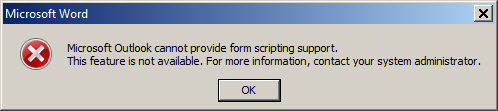
Solution:

1. Copy “OUTLVBS.DLL” from a PC where EV has not been installed, or the Office 2010 media to the directory where outlook.exe lives (Ex: C:\Program Files (x86)\Microsoft Office\Office14).  (Will solve error 1)

2. Delete the “OutlookVBScript” string regkey from “[HKEY_CLASSES_ROOT\Installer\Features0004109110000000000000000F01FEC]” (Will solve error 2)

Now if our messaging team will get that native Exchange archive feauture working.

14 responses to “Symantec Enterprise Vault Outlook 2010 Add-In on Citrix XenApp 6.5”

  1. Gérald

    Hello,

    I was facing the same problem in our XenApp 6.5 farms but I’ve implemented another workaround.

    Some registry keys for OUTLVBS.DLL are also missing in the XenApp servers so I’ve exported them from my Windows 7 and imported them into the servers:

    Windows Registry Editor Version 5.00

    [HKEY_LOCAL_MACHINE\SOFTWARE\Microsoft\Windows\CurrentVersion\Installer\UserData\S-1-5-18\Components\821B099E87A7C0C4D924CC21E8E02D00]
    “00004109110000000000000000F01FEC”=”C:\\Program Files (x86)\\Microsoft Office\\Office14\\OUTLVBS.DLL”

    [HKEY_LOCAL_MACHINE\SOFTWARE\Microsoft\Windows\CurrentVersion\Installer\UserData\S-1-5-18\Components\821B099E87A7C0C4D924CC21E8E02D000004109110000000000000000F01FEC]
    “PatchGUID”=”{38990592-F6A1-4A26-96C7-0600E36AE794}”
    “MediaCabinet”=”PATCH_CAB”
    “File”=”OUTLVBS.DLL_0001”
    “ComponentVersion”=”14.0.6009.1000”
    “ProductVersion”=”14.0.4763”
    “PatchSize”=”0”
    “PatchAttributes”=”0”
    “PatchSequence”=”10500”
    “SharedComponent”=”0”
    “IsFullFile”=”1”

    1. CyberRuiz

      Thanks for sharing the info Gérald. Just tried your fix and it seems to work as well.

      Daniel

  2. Gérald

    You’re welcome…

    Using this way, it’s not necessary to remove OutlookVBScript key.
    I prefer this solution because it may be used by something else 😀

    1. CyberRuiz

      Excellent point Gérald 🙂

  3. jpsj

    Many thanks for your help on this one

  4. Ben

    working great on citrix 4.5 running windows 2003 with outlook 2010 and evault client
    thanks

  5. Worked like a charm for us. XA6.5, Outlook 2010, evault client 7.5
    Thanks!!

  6. Mark

    we fixed this by adding the VBscript key through the installer. This is a Office setup problem when running on terminal server. You can fix it by running:

    msiexec /i {90140000-0011-0000-0000-0000000FF1CE} ADDLOCAL=OutlookVBScript /qb

    Source: http://support.microsoft.com/kb/302003

    GUID can be different per product.

  7. Dinant Scholte in ‘t Hoff

    May thanks, the problem is being solved with solution 2. Outlook 2010 and XenApp 6.5 on W 2008 R2.

  8. Shyam Masala

    Dude you saved me on this one – worked like a charm!

  9. lak

    My issue also resoved with this solution
    msiexec /i {90140000-0011-0000-0000-0000000FF1CE} ADDLOCAL=OutlookVBScript /qb

  10. Ron

    What value do you put in for NAMEOFENVIRONMENT

  11. […] Symantec Enterprise Vault Outlook … – Those darn Add-ins. They always get me. Had issues loading the Symantec Enterprise Vault client with Outlook 2010 running on XenApp 6.5. Got in touch with our …… […]

  12. I just wish the dev at MS and SYM would code everything right in the first place. Every time I patch office updates it puts that value OutlookVBS back in. It is now removed by my sealing script as I always forgot. One anoying little bit%$ of an error.

Leave a comment

I’m Daniel

Welcome to my tech corner, your go-to destination for insights, tips, and deep dives into NetScaler, Citrix, virtualization, and cloud technologies.

Here, I share expertise, practical guides, and the latest trends to empower IT professionals and enthusiasts.

Let’s connect



