While working on a new XenApp 6.5 implementation, we decided to deploy “XenApp Full Desktops” (AKA Poor Man’s VDI) with published apps, and XenDesktops all talking to a single XenApp Service Site (AKA PNAgent) -> behind multiple Services Site load balanced by the NetScaler that is 🙂

When you use single XenApp Services site to manage both XenApp and XenDesktop environments, or you’re providing published desktop and applications from your XenApp farm and XenDesktops, you’ve probably noticed that your users will get the Full Desktop icon and/or XenDesktop in their start menu.

Picture below shows me connected to a XA 6.5 Full Desktop running Citrix Receiver 3.4 Enterprise (I know 30MBs per user session).  The issue here is why should I see the XenApp Desktop icon when I am already connected to it?
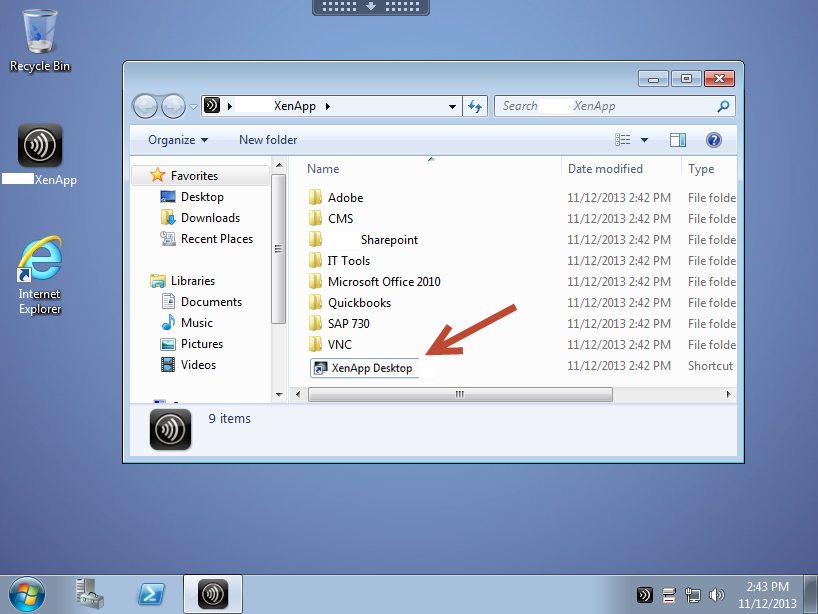
full_desk_pna

Environment:

  • Windows 2008 R2
  • Citrix XenApp 6.5 Hotfix Rollup Pack 2 / XenDesktop 5.6 <- (I know, not XD 7 yet)
  • PVS 6.1.16
  • StoreFront 2.0 / Web Interface 5.4

Solution:

Follow the instructions on CTX123969  which shows how to hide Published Applications, however keep in mind the goal here is not to hide published apps, but rather hide desktops from both XenApp and XenDesktop.

Replace the code with the following:

java.util.ArrayList filtered = new java.util.ArrayList();

 for (int i=0; i<resources.length; i++) {
 if (!(resources[i] instanceof com.citrix.wing.webpn.DesktopInfo)) {
 filtered.add(resources[i]);
 }
 }
resources = (ResourceInfo[]) filtered.toArray( new ResourceInfo[0] );


4 responses to “Hide XenApp Full Desktop/XenDesktop icons from WI 5.4 Services site”

  1. Peter

    Hi Daniel,

    I’m looking for a way to hide the desktop icons when using receiver enterprise 3.4 in combination with storefront 2.1 (legacy configuration enabled in order to use Pnagent)

    Regards,
    -Peter

    1. CyberRuiz

      Peter… I don’t have a direct answer for you as I am not running my PNA config on the storefront hosts.
      Take a look at this article. http://blogs.citrix.com/2012/06/17/hiding-in-the-clouds for now.

      Will certainly post a solution once I have it working

      Thank you
      Daniel

      1. CyberRuiz

        Peter… another link in case you use Citrix Netscalers.
        This works for both PNA Legacy and StoreFront since it is all handled at the XML broker.

        Hope this helps
        http://blogs.citrix.com/2013/11/18/hiding-xaxd-applications-by-using-netscaler-rewriting-functionalities/?utm_source=feedburner&utm_medium=feed&utm_campaign=Feed%3A+CitrixBlogs+%28Citrix+Blogs%29

        Daniel

  2. Peter

    Hi Daniel,

    The article http://blogs.citrix.com/2012/06/17/hiding-in-the-clouds works fine as long as you’re not using the receiverenterprise 3.4.

    I’m trying to do it the netscaler-way (manipulate the XML response by means of a rewrite policy) as you indicated.

    Thanks for pointing me in that direction. Keep up the good work with your blog !
    Regards,
    -Peter

Leave a reply to Peter Cancel reply

I’m Daniel

Welcome to my tech corner, your go-to destination for insights, tips, and deep dives into NetScaler, Citrix, virtualization, and cloud technologies.

Here, I share expertise, practical guides, and the latest trends to empower IT professionals and enthusiasts.

Let’s connect


