While working on an SAP 730 implementation, I noticed a customized application was preventing for sessions to log off when the application was terminated. This was causing for sessions to remain in an active state and for the roaming profiles to not sync.
The issue was caused by an application sub processes that was not closing properly. By default Citrix XenApp has a hard coded list of processes that are checked for and terminated when the user logs off.
Environment:
- Windows 2008 R2
- Citrix XenApp 6.5 Hotfix Rollup Pack 2
- PVS 6.1.16
- StoreFront 2.0
Solution:
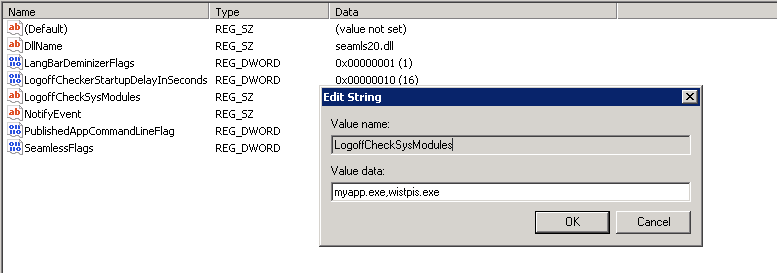
Modify the following registry key with the additional processes you wish to check.
HKEY_LOCAL_MACHINE\SYSTEM\CurrentControlSet\Control\Citrix\wfshell\TWI
Value Name: LogoffCheckSysModules
Type: REG_SZ
String: myapp.exe,myapp2.exe







 Daniel Ruiz
Leave a comment