While migrating to Access Gateway on the NetScaler 10.1.  I noticed the rewrite policies I implemented on 9.3 did not work.

While this can be done with some HTML customization, etc, and/or creating your own NetScaler theme, I just wanted to change the logon page by NetScaler Rewrite Policies.

Below are the policies that will allow you to do this.

Environment

  • MPX 8200 NetScaler 10.1: Build 122.17.nc
  • Web Interface 5.3 (Can’t deploy StoreFront here due to custom code we use)

Issue:

When two factor authentication is configured on Access Gateway Enterprise Edition, the user is prompted for User name, Password 1, and Password 2
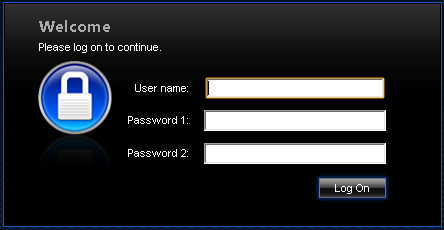
agee_no_active_pol

The issue  seems to be due to change in the ‘ns_showpwd’ function on login.js under /var/netscaler/gui/vpn/ as it has been updated from 9.3
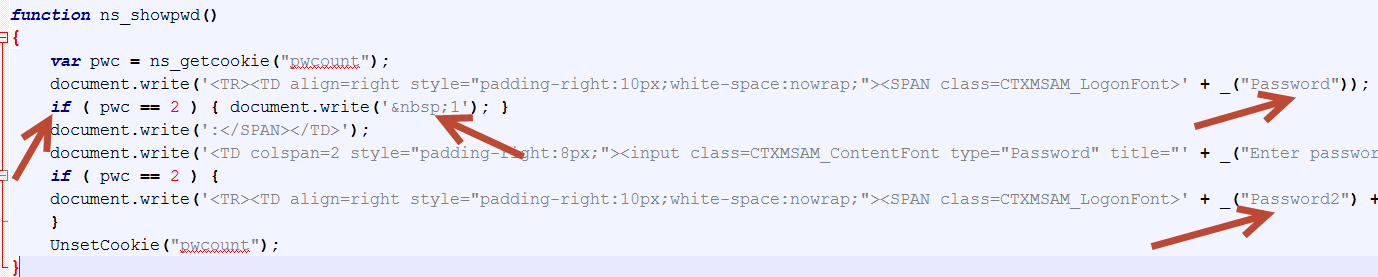
ns_showpwd function
ns_showpwd on Login.js


Solution:

1. Create the following actions under “Rewrite/Actions” with putty (no need to go under shell mode)

Rewrite Actions:

add rewrite action AD_agee_delete_rewrite_action delete_all “http.RES.BODY(120000).SET_TEXT_MODE(ignorecase)” -pattern “document.write(\’ 1\’);” -bypassSafetyCheck YES

add rewrite action AD_agee_replace_rewrite_action replace_all “http.RES.BODY(120000).SET_TEXT_MODE(ignorecase)” “\”AD Password\’\”” -pattern “\”Password\”” -bypassSafetyCheck YES -refineSearch q/extend(50,50).REGEX_SELECT(re!e![ ]*\'[ ]*\+[ ]*_\(\”Password\”\)[ ]*!)/

add rewrite action RSA_agee_replace_rewrite_action replace_all “http.RES.BODY(120000).SET_TEXT_MODE(ignorecase)” “\”RSA Code:\’\”” -pattern “\”Password2\”” -bypassSafetyCheck YES -refineSearch q/extend(50,50).REGEX_SELECT(re![ ]*\'[ ]*\+[ ]*_\(\”Password2\”\)[ ]*!)/

Rewrite Policies:

add rewrite policy AD_agee_rewrite_pol “http.req.url.path.endswith(\”vpn/login.js\”)” AD_agee_replace_rewrite_action

add rewrite policy RSA_agee_rewrite_pol “http.req.url.path.endswith(\”vpn/login.js\”)” RSA_agee_replace_rewrite_action

add rewrite policy AD_agee_delete_pol “http.req.url.path.endswith(\”vpn/login.js\”)” AD_agee_delete_rewrite_action

Bind the policies:

bind rewrite global AD_agee_rewrite_pol 100 NEXT -type RES_OVERRIDE

bind rewrite global RSA_agee_rewrite_pol 110 NEXT -type RES_OVERRIDE

bind rewrite global AD_agee_delete_pol 120 NEXT -type RES_OVERRIDE

Result:

Responder Policy AGEE 10.1

7 responses to “Customize AGEE logon page for NetScaler 10.1 via Rewrite policies”

  1. Javier Citrix Guru

    This honestly just saved my @$$

    Thank you Daniel!!!

    1. CyberRuiz

      He He! Saved my @$$ as well Javier

  2. Karl

    I’m getting a syntax error for the expression in the -refineSearch parameter. I dropped this part, and added the rewrite action via putty. Then I went into the GUI and pasted:

    q/extend(50,50).REGEX_SELECT(re!e![ ]*\'[ ]*\+[ ]*_\(\”Password\”\)[ ]*!)/

    Get a syntax error in the GUI as well. Any help?

    Thanks for this post. It is exactly what I need to do.

    1. CyberRuiz

      Karl,
      Thanks for visiting my blog.
      I assume you are referring to the “AD_agee_replace_rewrite_action”?
      If so if you create it manually, type the following under the “Refine Search”

      extend(50,50).REGEX_SELECT(re![ ]*\'[ ]*\+[ ]*_\(\"Password\"\)[ ]*!)

      1. Karl

        That did work, however I found another way to do what I needed. I changed the user_name and password fields in the en.xml file. My page is good to go now. Thanks.

      2. CyberRuiz

        Yes, modifying the en.xml file works. However when you reboot the NetScaler you will lose those changes.
        You will need to make sure your AG UI theme is set to “Custom” and create a customization package.
        You can read more about it under this post http://danielruiz.org/2014/11/05/customizing-citrix-netscaler-gateway-10-5-logon-page-with-dual-factor-authentication/

        If all you are after is to change the wording of the password 1: and password 2: then the rewrite policy will do.

        Note: The process of customizing the logon page for 10.1 and 10.5 is the same.
        Daniel

  3. Shane

    Great write up. Seeing my policy hits increase but the wording on the screen hasn’t changed. Running 10.5.54.9 if that makes a difference. The one thing that I had a problem with in your site was copying the code, it was pasting in special character formatting. So I just typed it all. But still, Ive gone through and it all matches.

Leave a comment

I’m Daniel

Welcome to my tech corner, your go-to destination for insights, tips, and deep dives into NetScaler, Citrix, virtualization, and cloud technologies.

Here, I share expertise, practical guides, and the latest trends to empower IT professionals and enthusiasts.

Let’s connect




